ContractorCounter Review
Know what you're signing before you sign it
AI contract review for construction: upload the contract PDF and every risky clause is highlighted on the page, in plain English, in minutes. US$19 per contract — no subscription, no demo call.
How it works
Drop in the contract
Drag the PDF you've been asked to sign onto review.contractorcounter.com — a subcontract, head contract, or purchase order. Nothing to install, no account to create.
AI reviews every clause
It reads like a contracts consultant working for you: payment terms, LDs, time bars, retention, indemnities, termination — each issue graded by severity. You see what was found before paying a cent.
Unlock the markup — $19
Pay once through Stripe and the full review opens: every finding highlighted on the page with a plain-English concern and a concrete "ask for this instead" for your negotiation email.
A lawyer-style markup, not a wall of chat text
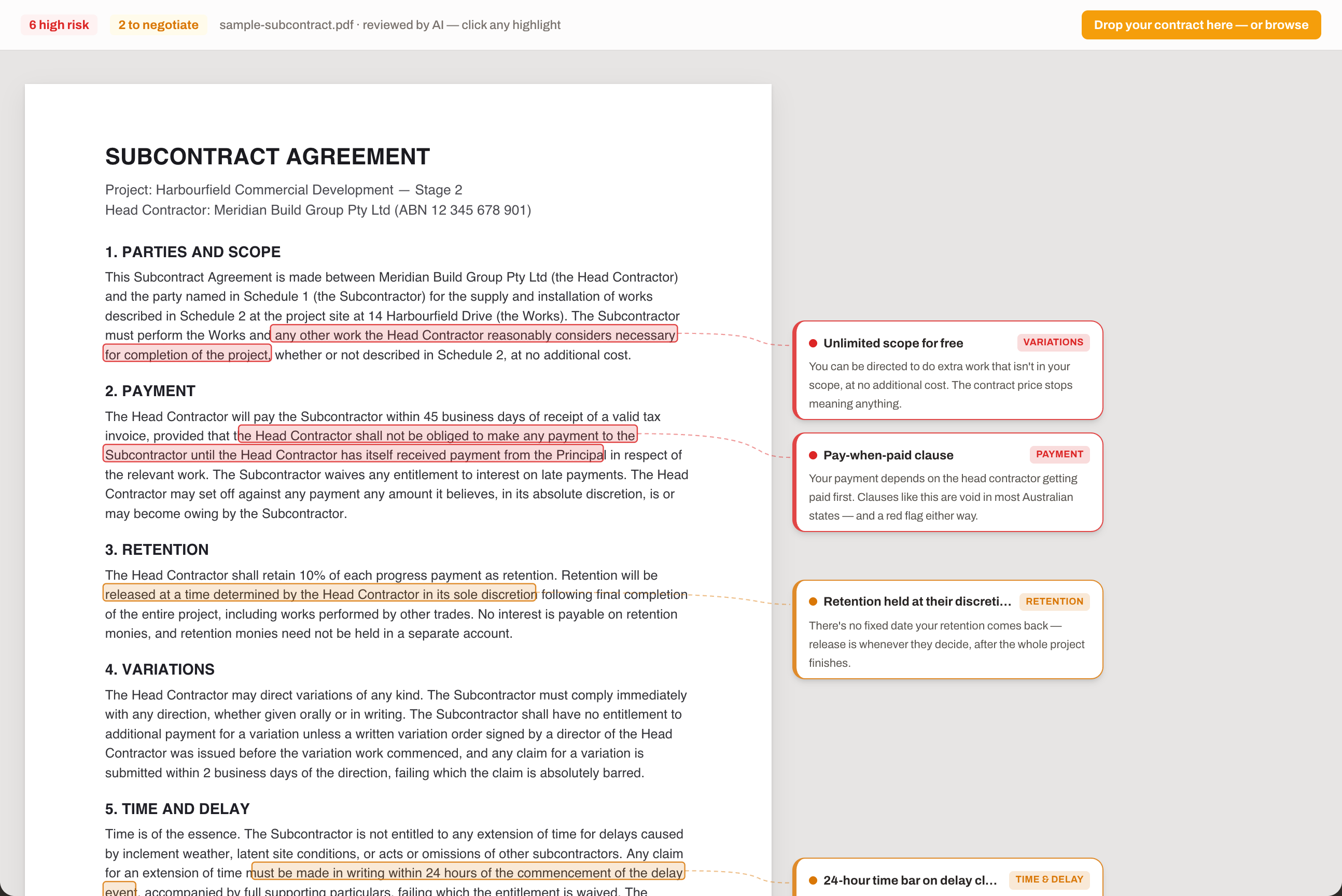
Findings are pinned to the exact clause on the page — highlighted text, a callout in the margin, and a sidebar with the concern and what to ask for instead.
The clauses it catches
Pay-when-paid & payment terms
Conditional payment, long terms, set-off rights, and statutory payment-rights waivers.
Uncapped liquidated damages
Daily LDs with no cap, flow-downs out of proportion to your scope.
Time bars & notice traps
Short EOT claim windows and notice preconditions that quietly kill entitlements.
Retention games
Oversized retention and release dates left to the other side's discretion.
One-sided indemnities
Indemnifying the other party for their own negligence — the clause insurers hate.
Ambiguous scope & variations
Open-ended scope, unpaid directed work, and variation procedures set up for disputes.
Not another enterprise contract platform
No demo call
Enterprise contract-AI platforms sell to head contractors and legal teams through sales demos and annual licences. This is a web page and a $19 button.
Priced per contract
You don't review contracts every day. Pay for the one in front of you — US$19 flat, whatever the page count — and nothing when you don't need it.
Built for the trades
Written for subcontractors and tradies in the US, Canada, the UK, New Zealand, and Australia — plain English, cash-flow first, no legalese to decode.
Contract review
One flat price per document, whatever the page count. The sample review is free, and the AI reads your contract before you pay.
Review a contract — $19FAQ
How does the $19 pricing work?
One flat US$19 per contract review, whatever the page count. No subscription, no account, no demo call. Upload the document, the AI reviews it, and you pay only to unlock the full marked-up result. A revised version of the contract is a new review.
Is this legal advice?
No. ContractorCounter Review is an AI-powered first-pass review that flags risky, one-sided, and ambiguous clauses so you know what to question. For contracts worth serious money, take the marked-up review to a construction lawyer — you'll spend their billable hours on judgment instead of reading.
What does it actually check?
Payment terms and pay-when-paid clauses, retention and its release, liquidated damages and caps, extension-of-time rights and time bars, variations, defects liability, indemnities and limitation of liability, insurance obligations, termination rights, notice requirements, dispute resolution, and statutory payment-rights waivers — plus anything unusually one-sided.
Does it work outside Australia?
Yes. It reviews construction contracts for contractors in the US, Canada, the UK, New Zealand, and Australia. The review flags the clause patterns that hurt subcontractors everywhere; jurisdiction-specific rights (like prompt-payment and security-of-payment protections) are called out where they matter.
Is my contract kept private?
The PDF never leaves your browser — only its extracted text is processed to produce the review, and it is not used to train AI models. Findings are stored temporarily to deliver your purchase (7 days unpurchased, 30 days after unlock) and then deleted automatically.
What about scanned contracts?
The reviewer needs a PDF with selectable text — which is what almost every contract sent by email has. OCR for scanned or photographed contracts is on the roadmap.
How long does a review take?
Usually 30–90 seconds from upload to results, whatever the page count. You see progress as the AI works through payment terms, damages, time bars, and the rest.
ContractorCounter Review is an AI review tool, not a law firm, and its output is not legal advice — read the ContractorCounter Review Terms. New to it? Start with Reviewing Your First Contract or browse the support docs.